

On this page
- What is a kitchen display system?
- How does a kitchen display system work?
- Kitchen display system vs paper tickets
- Key features of a kitchen display system
- The benefits for Irish hospitality businesses
- How KDS requirements differ by hospitality type
- CBE’s kitchen automation: ConnectSmart Kitchen
- What to look for in a KDS in Ireland
- Frequently asked questions
In a busy kitchen, the difference between a good service and a chaotic one often comes down to something surprisingly small: how orders get from the front of house to the pass. For decades that meant paper — printed dockets, handwritten notes, a rail of tickets that could slip, tear, or be pulled too early. A kitchen display system replaces all of it with a screen.
Kitchen display systems (KDS) are now standard in quick-service chains and increasingly common in Irish restaurants, pubs, hotels and cafés. But what exactly is a kitchen display system, how does it work, and is it worth installing in your kitchen?
This guide covers what a KDS does, how orders flow through one, how it compares to paper tickets, and what to look for when choosing a system in Ireland.
What Is a Kitchen Display System?
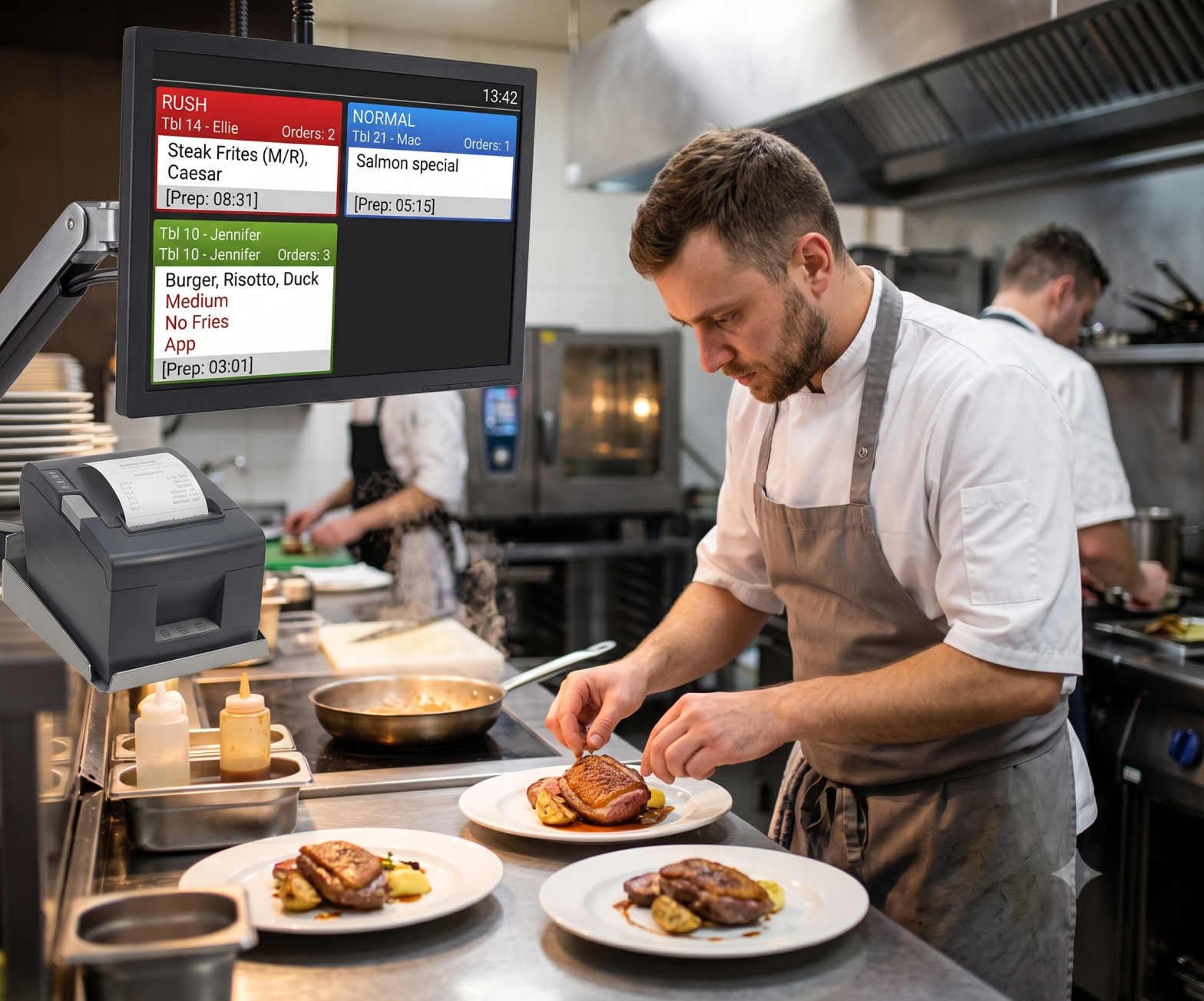
A kitchen display system is a digital screen, connected to your point of sale system, that shows incoming orders to kitchen staff in real time. Instead of a printer producing a paper docket, the order appears instantly on a screen at the relevant kitchen station — grill, fryer, cold larder, pass — where a chef can view it, work through it, and bump it off the screen once complete.
A KDS is not simply a digital version of a paper ticket. Because it is software, it can do things paper never could: prioritise orders, route different items to different stations automatically, calculate prep times so every dish for a table finishes together, and record exactly how long each order took.
How Does a Kitchen Display System Work?
The system sits between your POS and your kitchen. Here is what happens to a single order, from the moment it is taken to the moment it leaves the pass:
- The order is placed. A server enters it at the till or on a handheld, a customer orders at a self-service kiosk, or an order arrives from an online ordering or delivery channel.
- The POS sends it to the KDS. The order appears on screen immediately, with no printing delay and no risk of a lost docket.
- Items are routed to the right station. Rather than one ticket for the whole order, individual items can be sent automatically to the stations that prepare them, so different parts of a dish can be cooked simultaneously.
- Timings are calculated. The system factors in the prep time of each item and staggers when each station should start, so that everything for a table is ready at the same moment rather than one dish sitting under a lamp.
- Staff bump the order. As items are completed they are marked off. Front-of-house staff can see live progress, so servers know when a table’s food is coming without walking to the kitchen to check.
- Data is captured. Every order time, every station, every delay is recorded — giving managers and head office real numbers on kitchen performance rather than a gut feeling.
Because orders arrive from the POS rather than being re-keyed, a KDS also removes an entire category of error. There is no illegible handwriting to decipher, and special instructions or allergen notes are displayed clearly on screen rather than scribbled in a margin.
Most kitchens that move to a KDS are coming from a printer-and-rail setup. Here is how the two compare in practice:
| Consideration | Kitchen Display System | Paper Tickets |
|---|---|---|
| Order delivery | Appears on screen instantly from the POS | Printed, then carried or clipped to a rail |
| Risk of loss | Order cannot be lost or pulled early | Tickets slip, tear, or are removed by mistake |
| Legibility | Clear on-screen text; allergen and special instructions highlighted | Small print, faded ink, handwritten amendments |
| Station routing | Items routed automatically to the correct station | One ticket, manually read across all stations |
| Timing | Prep times staggered so dishes finish together | Relies on the chef’s judgement under pressure |
| Front-of-house visibility | Live order progress visible to servers | Servers must ask the kitchen |
| Reporting | Ticket times captured automatically by station and hour | No data unless recorded manually |
| Running costs | No paper or printer consumables | Ongoing paper rolls, ink and printer maintenance |
Key Features of a Kitchen Display System
Order management
A central hub for every incoming order, whether it originates at the till, a handheld, a kiosk or an online channel. Everything lands in one place, in the order it arrived.
Order prioritisation and dynamic routing
Not all orders are equal. Time-sensitive or urgent orders can be flagged and pushed up the queue, while items are routed dynamically to whichever station is best placed to prepare them. This is what prevents bottlenecks forming at a single station during a rush.
Programmable prep times
Each menu item is assigned a preparation time, and the system works backwards from the target service moment. A steak and a salad start at different times so they arrive at the pass together.
Real-time communication with front of house
Servers see live production information without interrupting the kitchen. Fewer trips to the pass, fewer misunderstandings, and a more accurate answer when a guest asks how long their food will be.
Capacity management
Dine-in, takeaway and delivery orders can be blended intelligently so that one stream does not swamp another — increasingly important for Irish operators juggling walk-in trade with delivery platforms.
Reporting and analytics
Ticket times by station, by hour, by day. Which dishes slow the kitchen down. Where the pinch points are. This is the feature operators tend to underestimate before installing a KDS and rely on most afterwards.
The Benefits of a KDS for Irish Hospitality Businesses
- Faster service. Orders reach the kitchen instantly and are sequenced intelligently, cutting ticket times and turning tables faster.
- Fewer errors. No lost dockets, no misread handwriting, and special instructions displayed clearly rather than squeezed onto a printed slip.
- Less food waste. Dishes finish together instead of sitting and spoiling, and fewer mistakes mean fewer plates thrown away and remade.
- Better guest experience. Accurate wait times, hotter food, and staff who can answer questions without disappearing into the kitchen.
- Accountability and insight. Managers can see exactly where time is going, and multi-site operators can compare kitchen performance across locations.
- Lower running costs. No printer, no paper rolls, no consumables — a small saving individually, but a steady one.
How KDS Requirements Differ by Hospitality Type
A kitchen display system is not one product. What a quick-service restaurant needs from it differs sharply from what a hotel or a coffee shop needs:
| Environment | Main pressure | What the KDS must do well |
|---|---|---|
| Quick-service restaurant | Speed and throughput at peak | Rapid bumping, dynamic capacity management across walk-in, drive-thru and delivery; Order Ready screens for customers |
| Full-service restaurant | Coursing and table synchronisation | Programmable prep times so a whole table is served together; clear display of allergens and modifiers |
| Pub / bar | Food and drink running in parallel | Separate routing to kitchen and bar; robust performance during short, intense food rushes |
| Hotel | Multiple outlets, one kitchen team | Handling restaurant, bar, room service and banqueting orders on the same system without confusion |
| Coffee shop / bakery | Short tickets, high volume | Compact screens, simple bump workflow, fast handling of takeaway and sit-in side by side |
| Stadium / campus catering | Extreme, concentrated demand | Multi-station scaling, resilience under load, and reporting across many outlets at once |
Whichever environment you operate in, the KDS only works as well as the point of sale system feeding it. If you are evaluating both together, our guide to the best POS system for restaurants in Ireland is a good place to start, and our full-service restaurant and quick-service restaurant pages set out how CBE configures the wider system for each.
CBE’s Kitchen Automation: ConnectSmart Kitchen
CBE delivers kitchen automation through ConnectSmart Kitchen, built in partnership with QSR Automations — a global leader in kitchen display technology. It brings together the features above in a system designed for real kitchens rather than showroom demonstrations.
Two things distinguish it. The first is resilience: ConnectSmart Kitchen runs on both a cloud-based and an in-store platform, so operations are fully redundant. If connectivity drops unexpectedly, the kitchen keeps working. The second is dynamic capacity management, which blends walk-in and takeaway traffic in real time based on actual kitchen throughput, so a surge in delivery orders does not derail service in the dining room.
CBE has also installed Order Ready screens — customer-facing displays that show when an order is complete — in Supermac’s outlets across Ireland and KFC outlets in Denmark. An Order Ready screen is an extension of the kitchen display system: it takes the data the KDS already holds and uses it to reduce the wait-time anxiety that customers feel when queuing.
Kitchen automation works best as part of a connected system. It integrates with CBE Innova, our advanced hospitality POS, and with CBE Mobile Order & Pay, so an order taken at the table appears on the kitchen screen the moment the server confirms it.
What to Look for in a Kitchen Display System in Ireland
- Genuine POS integration. A KDS bolted onto a POS from a different vendor is a common source of frustration. One provider for both means one number to call.
- Redundancy. Ask what happens when the internet drops mid-service. The answer should be “nothing”.
- Hardware built for kitchens. Heat, steam and grease are unforgiving. Consumer screens do not last.
- Configurability. Your stations, your menu, your service style — the system should adapt to the kitchen rather than the reverse.
- Support when you are trading. Kitchens are busiest at evenings and weekends. CBE provides support 7 days a week, 365 days a year, from an Irish-based team.
Frequently Asked Questions
A kitchen display system (KDS) is a digital screen connected to your POS that shows incoming orders to kitchen staff in real time, replacing printed paper dockets. It routes items to the correct station, staggers prep times so dishes finish together, and records how long each order took.
The systems that improve efficiency most are those that combine dynamic order routing, programmable prep times and real-time reporting — rather than simply displaying a ticket on a screen. CBE’s kitchen automation solution, ConnectSmart Kitchen, does all three, and adds dynamic capacity management so dine-in, takeaway and delivery orders do not disrupt one another.
It has to. The KDS receives orders directly from the point of sale, so integration is fundamental rather than optional. The smoothest setups come from a single provider supplying both, which removes the finger-pointing that occurs when a screen and a till come from different vendors.
A well-designed system keeps working. ConnectSmart Kitchen runs on both a cloud-based and an in-store platform, making operations fully redundant — if there is an unexpected outage, you do not lose functionality. This is an important question to put to any provider before committing.
Often, yes. The benefits — fewer lost dockets, less food waste, faster table turnaround — scale down as well as up. A single screen in a small kitchen can remove the printer entirely. The right question is not the size of the kitchen but how much time is currently lost to order errors and rework.
An Order Ready screen is customer-facing, showing diners when their order is complete. It is an extension of the kitchen display system, drawing on data the KDS already holds. CBE has installed Order Ready screens in Supermac’s outlets in Ireland and KFC outlets in Denmark, where they reduce customer anxiety about wait times.
Cost varies from restaurant to restaurant, depending on the functionality and equipment required — the number of screens, the stations covered, and whether Order Ready displays are included. The most reliable way to get a figure is a consultation based on your kitchen layout and menu.
Bring Order to Your Kitchen
A kitchen display system is one of the few pieces of hospitality technology that staff notice on day one — fewer lost dockets, calmer services, food leaving the pass together. For Irish restaurants, pubs, hotels and quick-service operators under pressure on both labour and margin, it is among the most practical investments available.
CBE has been building and supporting hospitality technology in Ireland for over 45 years. Talk to our team about kitchen automation, or book a demo to see ConnectSmart Kitchen running in a live environment.